
How to Print or Subscribe to Your Curbside Collection Calendar

Use the Raleigh Reuse App to print or subscribe to your collection calendar

To view your collection schedule, enter your address in the Raleigh Reuse App.

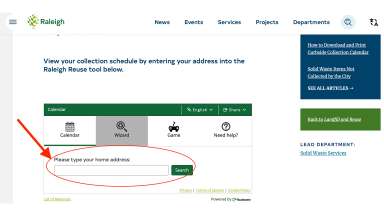
1. Open the Raleigh Reuse App:

  • Scroll until you see the box with the green header.
  • Enter your service address in the search box and press "Search."
Screenshot showing spot on website to enter address in Raleigh Reuse tool

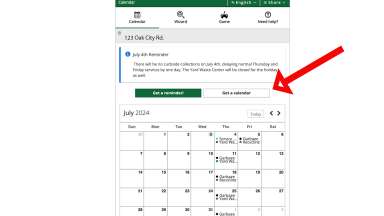
2. Select calendar view

  • A monthly calendar view will appear, displaying your curbside collection dates for the current month.
  • To view the collection schedule for the full year, click on "Get a Calendar."
Screenshot showing Get a Calendar button on reuse tool

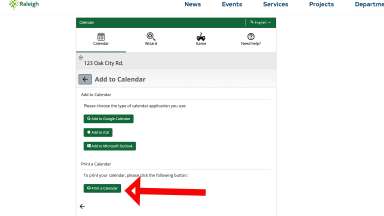
3a. To get a hard copy of the calendar, select "Print a Calendar."

Screenshot showing Print a Calendar button on Raleigh Reuse tool

3b. To get a digital version, subscribe with "Add to Calendar":

  • Select one of the options:
    • Add to Google Calendar
    • Add to iCal
    • Add to Microsoft Outlook
  • Follow the directions given for the option you chose.

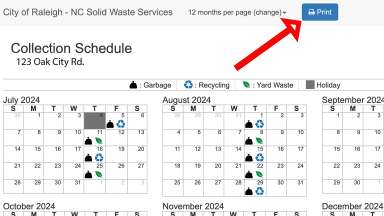
4. Print the year-long calendar view:

  • When you select "Print a Calendar", a new page appears showing a year-long calendar with your collection dates.
  • At the top of the page, select "Print". 
Screenshot showing year-long calendar view and print button of Raleigh Reuse Tool

Questions?

If you have any questions, please contact the Customer Care Center at 919-996-3245 or send an email to sws@raleighnc.gov.

Department:
Solid Waste Services
Related Services:
Raleigh Reuse Web Tool and Mobile App

Subscribe

 
Scroll to top